

The Creator Mode (also known as Rockstar Creator) for GTA Online enables players to design and publish playable custom Jobs for the GTA Online community.
With access to some of the same tools as Rockstar's design and development teams, you can craft your own custom blood-soaked gunfights, high-octane street races, intense objective-based battles, and more.
Strategically place pick-ups, define weaponry, location, and tons of other variables to make your own unique Job for others to take on.
You’ll be able to publish your original Jobs via the Rockstar Games Social Club for the whole community to discover, download, play, rate, and share.
Available Job Types
The features available in the Content Creator have been continually improved over time via the numerous Title Updates.
In the GTA Online Creator, players can create custom Jobs for the following modes:
- Deathmatch: added with Update 1.07 (December 10, 2013)
- Team Deathmatch: added with Update 1.07 (December 10, 2013)
- Standard Races: added with Update 1.07 (December 10, 2013)
- Capture: added with Update 1.12 (April 11, 2014)
- Last Team Standing: added with Update 1.12 (April 11, 2014)
- Stunt Races: added with Update 1.35 (August 2, 2016)
- Transform Races: added with Update 1.41 (November 28, 2017)
- Target Assault Races: added with Update 1.43 (June 5, 2018)
- Arena War: added with Update 1.46 (February 28, 2019)
- King of the Hill: added with Update 1.47 (November 14, 2019)
- Survival: added with Update 1.47 (November 14, 2019)
- Open Wheel Races: added with Update 1.51 (August 11, 2020)
- Mission Creator: added with Update 1.72 (December 10, 2025)
- This new in-depth and comprehensive toolkit enables you to design and publish your own Missions using sophisticated game mechanics, custom objectives, placeable actors, and much more.
GTA Online Creator Tutorial
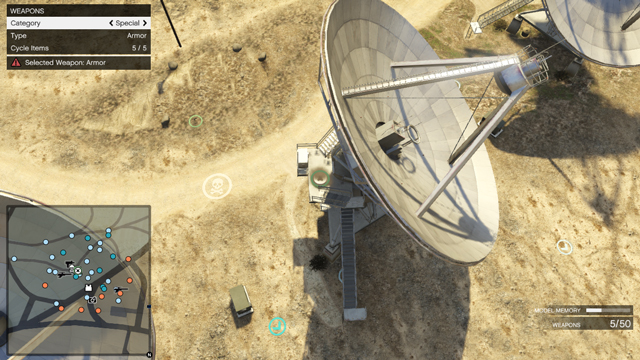
- Enter Creator Mode
- In GTA Online, pause the game, navigate to Online > Creator from the menu.
- Choose the type of job you want to create (Race, Deathmatch, Capture, LTS, etc.).
- Select the Location
- Pick a place on the map where you want your job to take place.
- Consider terrain, traffic, proximity to spawn points, and how many players you expect.
- Place Basic Elements
- For a Deathmatch: Place spawn points, weapons, cover props, boundaries, etc.
- For a Race: Place start point, finish line, checkpoints, vehicle respawns, barriers, props.
- For a Capture: Place capture zones, spawn points for teams, props, vehicles/NPCs if applicable.
- Test the Job
- Once you have finished building your job, use the play-test function in Creator to simulate how it plays.
- You must complete a valid test before publishing any Job.
- Publish and Share
- Once satisfied, publish your job via the in-game menu (it will upload to the Rockstar Games Social Club).
- Use descriptive names, tags, and a good thumbnail so players find your job.
- Others can play your job; you may also get it verified by Rockstar if it meets their standards.
- After publishing you can still take feedback, revise the job and republish.
If you're new to GTA Online's Creator and looking for some fundamental instructions on getting started, check out the official Rockstar how-to PDF guides for making LTS Jobs, Captures, Races, Deathmatches, and more.
Community Series
Rockstar regularly reviews some of the best community-created content and features them as part of the Community Series (previously called "Rockstar Verified Jobs"), then shares them with the entire GTA Online community.
Keep an eye on the Rockstar Newswire, as well as notifications in-game, to play the latest community Jobs, and try to get one featured yourself.
or post as a guest
Be the first to comment.